Describe the task. Ghosthand automates it.
One platform to design, run and manage automations. Build visually, or tell the AI what to do once and let Ghosthand turn it into a workflow that runs again and again with no AI and no extra cost.
Connects to the systems your team lives in
Product names belong to their owners and are listed only to show what Ghosthand can work with.
Repetitive work still runs on people and fragile scripts
Copying figures between systems, filling the same forms, collecting reports every month. It is slow, easy to get wrong, and the usual fixes come with their own costs.
Hours lost every week
Skilled people spend their days on clicking, copying and checking instead of the work they were hired for.
Automations that break
A page changes and a selector stops working. Someone has to find the problem, fix it by hand and publish again.
Heavy, costly tools
Many platforms are complex to set up, priced per robot and need specialists for every small change.
From an idea to a running automation in three steps
Describe or design
Write the task in plain words and watch the AI do it in a real browser, or drag activities onto a flowchart in the Designer.
Publish once
The steps become a normal workflow. Publish it to the Hub with one click. From here on, no AI is needed to run it.
Run and watch
Start it from the Desk, schedule it, or let a queue feed it. See every run, log and failure in the Hub.
Tell it once. It never asks the AI again.
Type what you want in plain words. An AI model drives a real browser step by step. When it works, Ghosthand saves what the AI did as a normal workflow, so the next runs are fast, predictable and cost nothing in AI usage.
- ✓No selectors to write. The AI finds the fields and buttons by what they are called on the page.
- ✓Passwords never reach the AI. It only sees placeholders. The real values are typed locally.
- ✓Your model, your rules. Use Claude, ChatGPT, Azure OpenAI, or a gateway your company has approved.
- ✓Guardrails. Allowed websites, a step limit and a full step log with token counts.
- ✓Keeps your prompts. Every request is saved with its workflow, so you can pick the work up again later.
In early tests a five-step task cost about two US cents, once.
Four parts that fit together
Build in the Designer, manage in the Hub, start from the Desk, and let Workers do the running.
Illustrative screens with sample data.
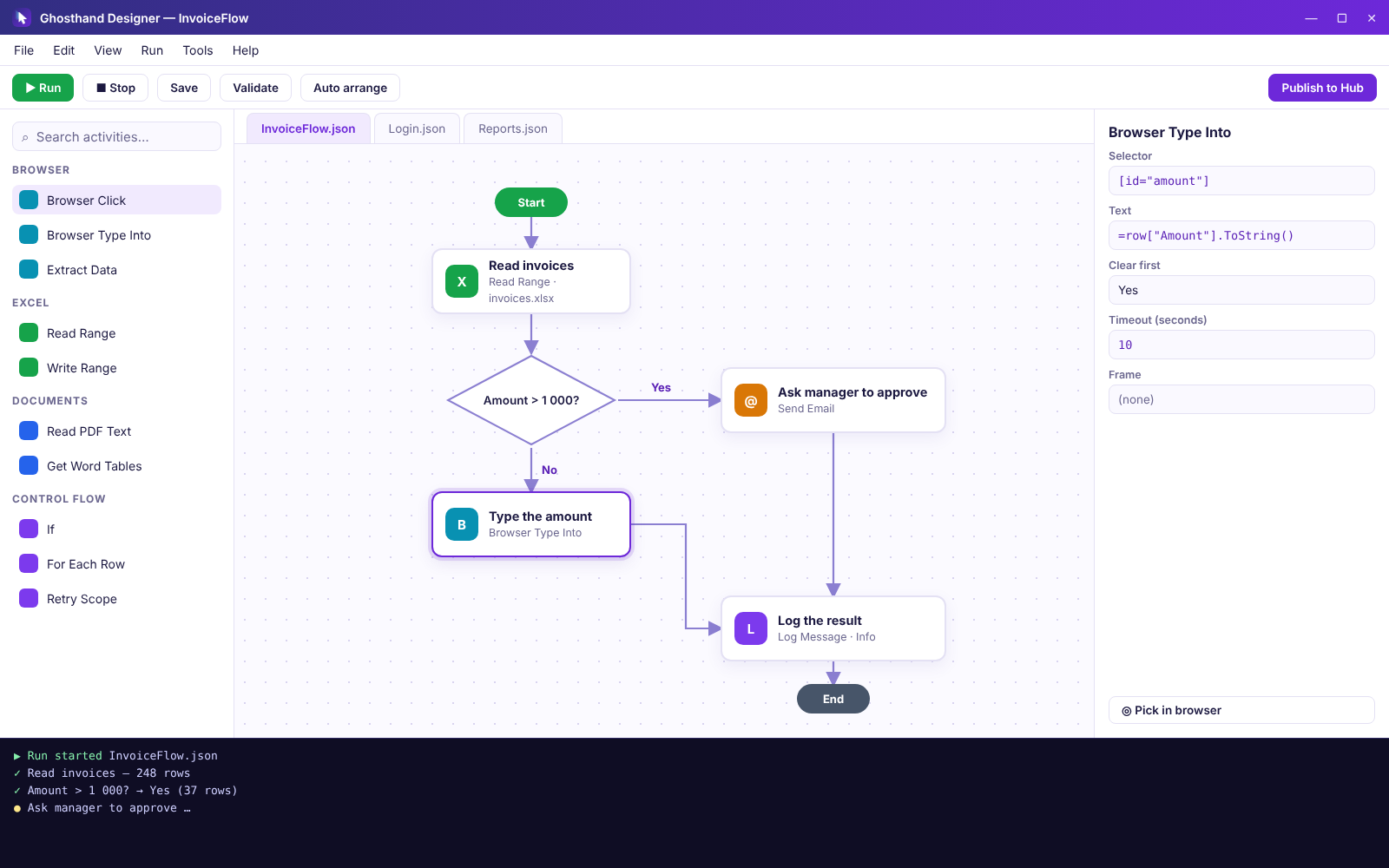
The Designer
A visual workspace where building an automation feels like drawing it.
- Sequences for simple steps, flowcharts with decisions and arrows for the rest
- Pick a button or field straight from the page, with selectors that are checked for you
- Copy, paste and multi-select to rearrange quickly, undo anything
- Run and debug with breakpoints, then publish to the Hub in one click
- Eight colour themes including a full dark mode
Illustrative screens with sample data.
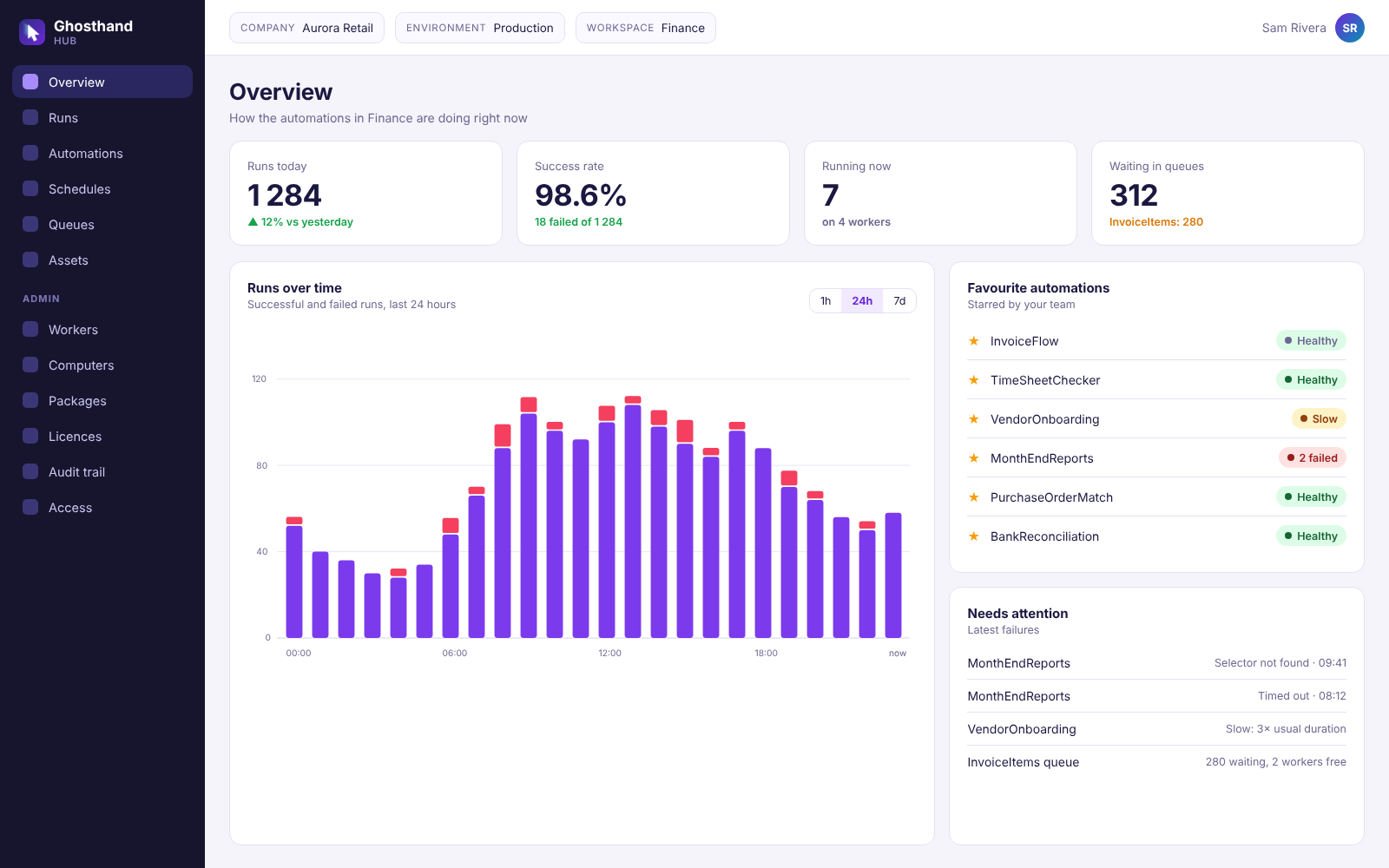
The Hub
The control room for the whole team, in your browser.
- Overview dashboard with runs over time, status and favourites
- Runs with filters, priorities, logs and a stop or kill control
- Schedules (time and queue), queues with work items, shared assets and credentials
- Companies, environments and workspaces keep teams apart
- Roles, audit trail and licences per company
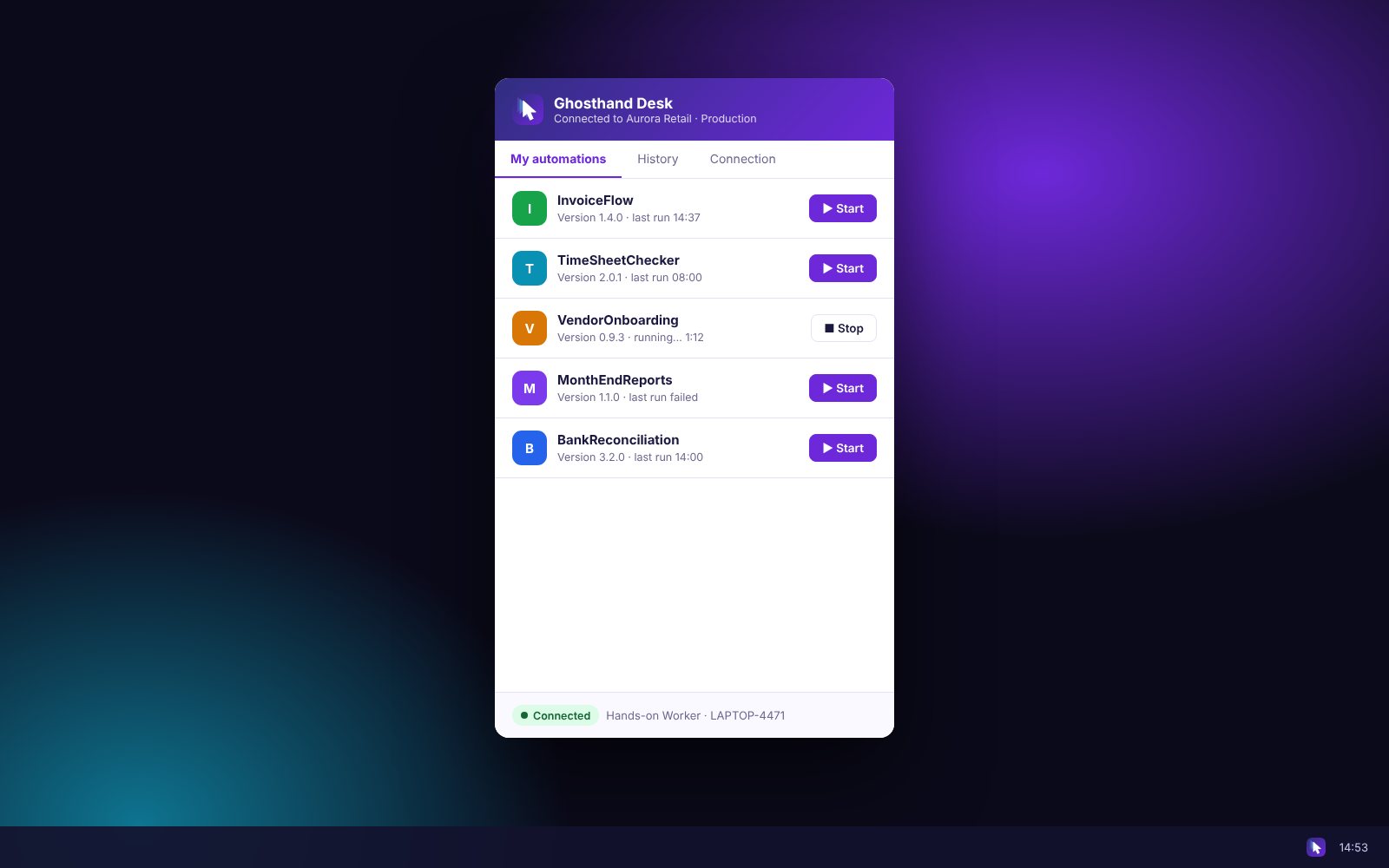
Illustrative screen with sample data.
The Desk
A small window in the system tray for the people who use the automations.
- Start, stop and watch the automations assigned to you
- See the history of your own runs
- Connects to your company's Hub with one setup
- Runs next to you, so you can do other work meanwhile
Hands-on
Runs beside a person, on their own computer, started from the Desk. Good for tasks that need a human to hand over or check.
Hands-free
Runs on its own on a server. Ghosthand creates its own Windows session for each run, signs in with a stored credential and signs out when it is done.
Stored credentials
Logins are stored in the Hub as credentials. Workflows ask for them by name, so nobody types a password into a workflow.
Scales with you
Add Workers when the work grows. Licences show what is used and what is left.
The Worker
The engine that does the work.
- One program that runs on laptops and servers
- Browser, desktop, Office, PDF, database and email activities
- Logs every step back to the Hub
- Picks up packages and workflows automatically
Everything a team needs to automate real work
AI Browser Task
Plain-language tasks recorded once into a normal workflow. Prompts are saved per workflow and the AI is only needed again when the website changes.
Visual workflows
Sequences and flowcharts with decisions, loops and retries.
Browser automation
Chrome and Edge. Click, type, pick lists, tables, downloads and frames.
Data scraping
Point at a table in your open browser and Ghosthand extracts it into a data table.
Desktop apps
Automate Windows applications with a built-in selector explorer.
Documents and data
Read and write Excel, Word, PowerPoint and PDF, run OCR on scans, and work with CSV, data tables and databases.
Schedules and queues
Start runs on a timetable, or whenever work items arrive in a queue. Priorities and retries included.
Many teams, one Hub
Companies, environments and workspaces with their own access.
Licences built in
Pools per company with warnings before limits are reached.
Packages
Add capabilities as packages. Publish bundles them with your workflow.
190+ activities, ready to use
Browser
Excel, Word, PDF
Data and databases
Email and Office
Hub
Utilities
Built so your data and your logins stay yours
Automation touches sensitive systems. Ghosthand is designed around that from the start.
Secrets stay local
The AI sees placeholders, never passwords. Real values are typed on your computer and hidden if they appear on a page.
Protected keys
AI keys are stored with Windows protection, for the signed-in user only. They never go into workflows.
Companies kept apart
Row-level security in the database separates every company's data.
Roles and access
Decide who can see, edit, publish and run, per workspace.
Audit trail
Changes and actions are recorded, so you can answer who did what and when.
Allowed websites
Limit an AI task to the sites it needs. It stops if the browser goes anywhere else.
Runs on your servers
Host the Hub on Windows Server with IIS and SQL Server. Your data does not leave your network.
HTTPS
Use your own certificate for encrypted connections between every part.
Sign-in with your company directory is on the roadmap.
Simple to install, simple to understand
On your servers
The Hub is a web application for Windows Server with IIS and SQL Server. An installer sets it up and upgrades it without losing your data.
On every computer that works
One installer puts the Designer, the Desk and the Worker on a laptop or a server.
AI only if you want it
Everything runs without AI. When you use it, you choose the model and where it runs.
Wherever people repeat the same steps
Finance back office
- Invoice entry and checks
- Bank and ledger reconciliation
- Month-end report collection
HR and time reporting
- Timesheet reminders and checks
- Onboarding steps across systems
- Monthly summaries
Operations and correspondence
- Sort and route incoming email
- Read PDFs and scans, fill systems
- Update records in several applications
Data collection
- Scrape tables from web pages
- Download files on a schedule
- Combine into Excel or a database
IT operations
- Run scripts and commands on a timetable
- Check systems and report problems
- Move and archive files
Reporting
- Build reports from several sources
- Create Word, PowerPoint and PDF output
- Send results by email or SharePoint
Where Ghosthand is, and where it is going
Ghosthand is in early access. This is the current plan and it will change as real users ask for things.
Available Now
- Designer with sequences and flowcharts
- Hub with runs, schedules, queues, assets, licences
- Desk and Workers, hands-on and hands-free
- Browser, desktop, Office, PDF, database, email activities
- AI Browser Task with a pluggable model
- Installers for the Hub and for the Designer, Desk and Worker
Next Planned
- AI repairs a broken selector at run time
- Continue an AI task from an existing workflow
- AI tasks in your own signed-in browser
- Parameters for values like dates
Later Ideas
- Approvals: people review and decide inside a run
- Sign-in with your company directory
- Flows that connect several automations
- Dev, test and production promotion
- Alerts and cloud hosting
Be one of the first to run it
Ghosthand is looking for teams who want to automate real work and help shape the product.
- ✓A guided pilot on one of your own processes
- ✓Direct access to the person who builds it
- ✓Your feedback decides what is built next

Yasoda
Creator of GhosthandYasoda designed and built Ghosthand: the Designer, the Hub, the Desk and the Worker. Features are added because a real process needed them, then tested on real websites and documents.
Good questions, straight answers
Where does it run?
On your own Windows servers and computers. The Hub needs IIS and SQL Server. The Designer, Desk and Worker run on Windows. Your data stays in your network.
Does my data go to an AI?
Only if you use the AI Browser Task, and only the text of the page the AI is working on. Passwords and secrets are never sent. You choose the model, including one your company has approved. Everything else in Ghosthand runs without AI.
Does the AI run every time?
No. The AI is used once to record the task as a normal workflow. After that the workflow runs by itself. There is also an activity that uses the AI at run time for tasks that change often, and it is clearly separate.
Which AI models can I use?
Claude, ChatGPT and Azure OpenAI, plus any service that uses the same interface as ChatGPT, such as a company gateway or a local model.
What happens when a website changes?
Run the AI task again and replace the affected steps. Automatic repair of broken steps at run time is planned.
Is it ready for production?
Ghosthand is in early access. The core is working and used in testing on real processes. We recommend starting with a guided pilot on one process.
What does it cost?
Pricing is being shaped with the first teams. Early-access partners get a say in it. Contact us to talk about your case.
See Ghosthand on your own process
Tell us what your team repeats every week. We will show you how it would look in Ghosthand.
hello@your-domain.com